

For a person who likes watching movies and TV series, he must subscribe to Netflix, and so do I. Watching movies and TV series through Netflix is an important part of my entertainment activities. What a relaxing thing it is when we can enjoy movies or television on the couch after a day’s work.
नेटफ्लिक्स ने अलग-अलग मोबाइल प्लेटफॉर्म पर अपने आधिकारिक एप्लिकेशन लॉन्च किए हैं और यह लोगों को एक अच्छा अनुभव प्रदान करता है। इसके अलावा, नेटफ्लिक्स ऐप्पल टीवी को सपोर्ट करता है, जो लोगों को बेहतर देखने का अनुभव प्रदान करता है। हालाँकि, यह अफ़सोस की बात है कि नेटफ्लिक्स ने अभी तक macOS प्लेटफ़ॉर्म के लिए कोई एप्लिकेशन लॉन्च नहीं किया है। कहने का तात्पर्य यह है कि, यदि आप macOS प्लेटफ़ॉर्म पर फ़िल्में और टीवी श्रृंखला देखना चाहते हैं, तो एकमात्र तरीका एक वेब पेज के माध्यम से देखना है जो देखने का अच्छा अनुभव प्रदान नहीं करता है जो कि मूल एप्लिकेशन द्वारा प्रदान किया जा सकता है। इस प्रकार, जब मुझे संयोग से इसके बारे में पता चला तो मैं क्लाइंट के तीसरे भाग - नेटफ्लिक्स के लिए क्लिकर से संतुष्ट हूं। क्योंकि इसका इंटरफ़ेस डिज़ाइन और उपयोगकर्ता अनुभव दोनों ही मुझे ताज़ा महसूस कराते हैं।
Nearly Native Interface Design

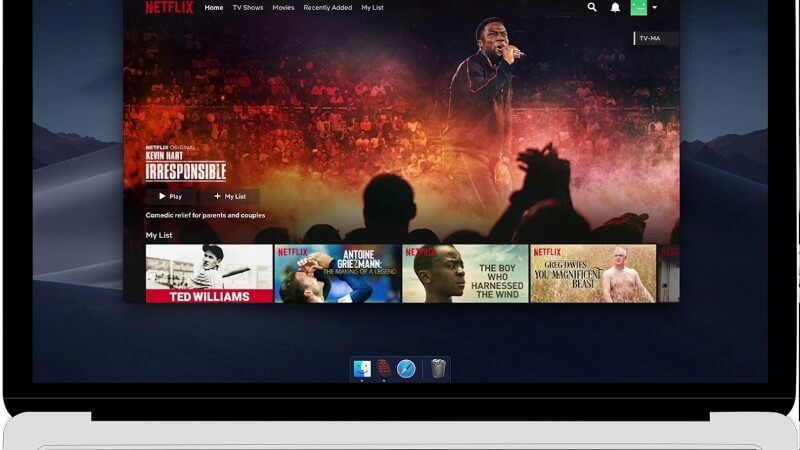
Opening Clicker for Netflix for the first time, you will be familiar with its interface because its interface is almost the same as that of the web page version.
After careful experience, you will find it is actually an application that is implemented through web page encapsulation, but the developer has optimized it and given it more functions. Nevertheless, it is more refined in interface design and UI than the web page version of Netflix, which makes me feel that it seems like an official client.
Almost Perfect User Experience
As mentioned above, Clicker for Netflix is developed on the basis of Netflix’s web page version. Clicker for Netflix also has some indispensable basic functions, such as adjusting subtitles, controlling volume, and selecting TV series. But as an excellent third-party client, these are not enough for Clicker for Netflix to attract users. Consequently, developers have made great efforts in optimizing and adding functions of Clicker for Netflix in order to bring a relatively perfect user experience to users.
The following are several points of Clicker for Netflix’s functions:
- ब्राउज़र पर सीधे देखने की तुलना में, यह समृद्ध इंटरफ़ेस नियंत्रण प्राप्त कर सकता है।
- The native Touch Bar touch experience allows users to perform many quick operations directly.
- Supporting picture-in-picture playing.
- प्लेबैक इंटरफ़ेस के सामान्य स्क्रीनशॉट प्राप्त किए जा सकते हैं, लेकिन यह ब्लैक स्क्रीन घटना नहीं दिखाई देगी।
- A quick view of unfinished content that hasn’t been watched before.
Now let me focus on the function of picture-in-picture playback. It is one of the great functions I love. Netflix’s official client on the iPad has not yet supported this function.
जब फिल्में या टीवी श्रृंखला प्लेबैक इंटरफ़ेस में प्रवेश करती है, तो हम देख सकते हैं कि इंटरफ़ेस के ऊपरी-दाएँ कोने में एक "विंडो" जैसा चिन्ह है। इस पर क्लिक करके, आप पिक्चर-इन-पिक्चर प्लेबैक मोड में प्रवेश कर सकते हैं और तुरंत वीडियो चला सकते हैं।
Compared with the native web page version, the great advantage of picture-in-picture playback is that users can have one eye on watching movies and one eye on doing other things. For example, I can surf Facebook or reply to emails while watching movies. Thus it is really possible to work and entertain at the same time.
It should be noted that Clicker for Netflix, the same as the web page version, doesn’t support 4K playback and will maintain the 1080P playback of the desktop version. Originating from Netflix, this function is limited by Netflix but it doesn’t affect the user experience.
इस बीच, नवीनतम संस्करण अपडेट के बाद, डेवलपर्स ने उपयोगकर्ताओं को एक ही समय में दो डिवाइस सक्रिय करने की अनुमति दी, जबकि पहले केवल एक डिवाइस सक्रिय किया जा सकता था। यहां डेवलपर्स के लिए एक प्रशंसा है।
Is it worth buying?
It’s obvious that Clicker for Netflix implements many functions that the web page version does not have. In addition, as the first third-party client of Netflix on Mac, the user experience is very good. So here we recommend it to you who like watching movies and TV series. I believe you will like it after using it. It only takes you $5 to buy the application on the developer’s official website.
While learning about this application, I also took the opportunity to sort out the movies and TV series I had seen before and found that I was not a real fan of movies and TV series, because the times I watched them were not as many as I expected. But I still insist to subscribe to Netflix every month by reason that I prefer the form of “streaming media”, no matter if it is Apple Music or Netflix. Which way do you prefer to listen to music or watch movies and TV series in your daily life? Welcome to share your opinions with me in the comments.